Coming from Product Hunt? Welcome. Pro Guard is $29 once. It checks once a minute while the app is open and cleans up leftovers without a click when memory runs short. If you hit a bug or have a question, ask on our launch page and I'll answer there.
Clean up what your coding agents leave running.
The free menu bar app shows which agent sessions and helper processes use memory, and lets you stop leftovers by hand. Pro Guard ($29 once) checks memory once a minute while the app is open and Auto-Guard is on, and cleans up without a click when memory runs short.
Download for Mac (free) Get Pro Guard, $29 onceApple Silicon · macOS 14 or later · Node.js needed for the cleanup, scan, pause, fan, jobs and Agents-menu controls, and for Auto-Guard.
Pro Guard is $29 once. No subscription, no account, full refund within 30 days.
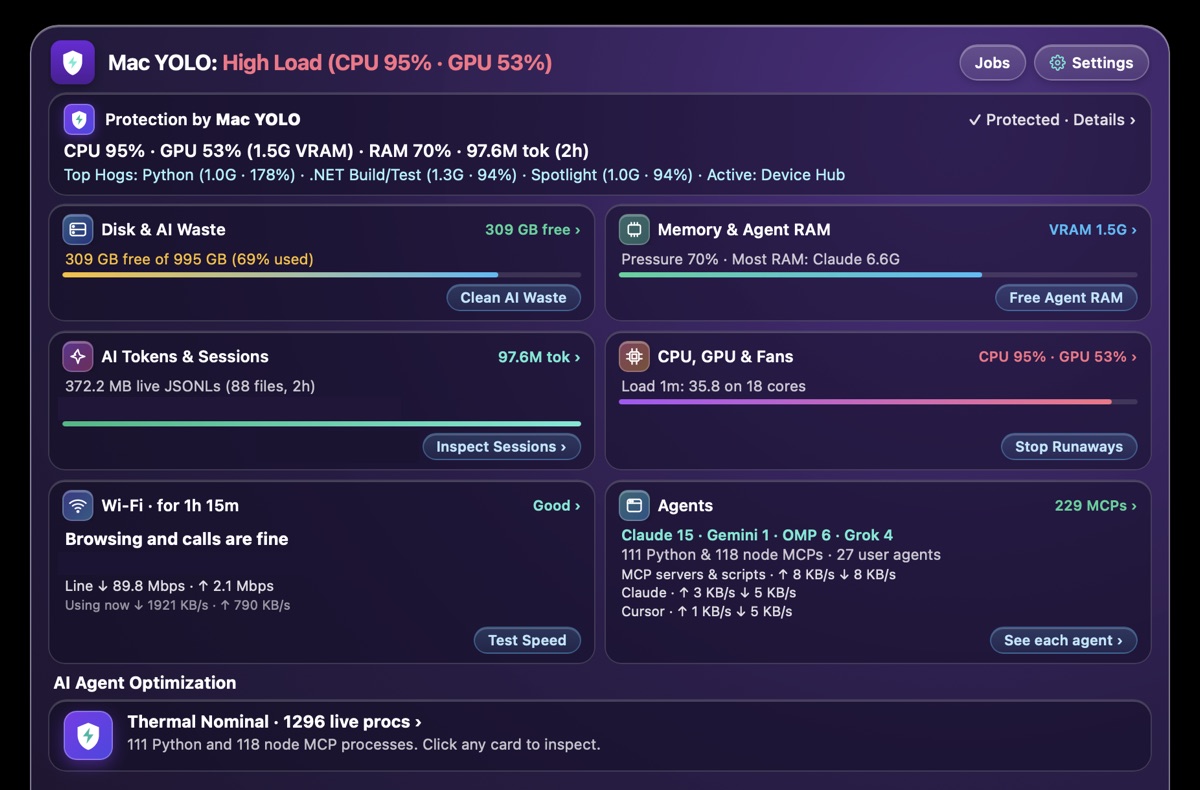
API keys, tokens and passwords in plain text. Coding agents copy them into their own session logs. Mac YOLO counts the ones in your session logs from the last 30 days, and blanks them out in two clicks. It is in the free app.
Version 1.2.13. macOS 14 or later on Apple Silicon. The cleanup, scan and stop buttons, and Pro's once-a-minute check, need Node.js on your Mac. If it is missing, the buttons say so and show the install command. Signed with an Apple Developer ID and notarized by Apple, so it opens without warnings. No account needed. Also available as a .pkg installer or with Homebrew:
brew install --cask igorganapolsky/tap/mac-yolo-safeguards
What it does
- Blanks secrets out of agent logs. Agents copy API keys and passwords into the session transcripts they keep on disk. The app counts them and replaces each one with a marker such as [REDACTED:openai-key]. Transcripts changed in the last 2 minutes are skipped. Any other transcript from the last 30 days is rewritten, including one from a session that is open but idle.
- Shows which agent is the problem. CPU, GPU, memory, swap and disk, with the top hogs named, so you can tell a runaway agent from Spotlight indexing.
- Stops leftover agent processes. MCP servers and helpers that outlive their session get stopped.
- Frees disk space. One click deletes the files and folders inside Claude Code's temp session folders in /private/tmp when nothing in them has changed for 24 hours, even if that session is still open, and the npm, Homebrew, pip, TypeScript, Swift and Node compile caches. It also deletes the Adobe media cache when none of Premiere Pro, After Effects, Media Encoder, Audition or Premiere Rush is open.
Why it exists
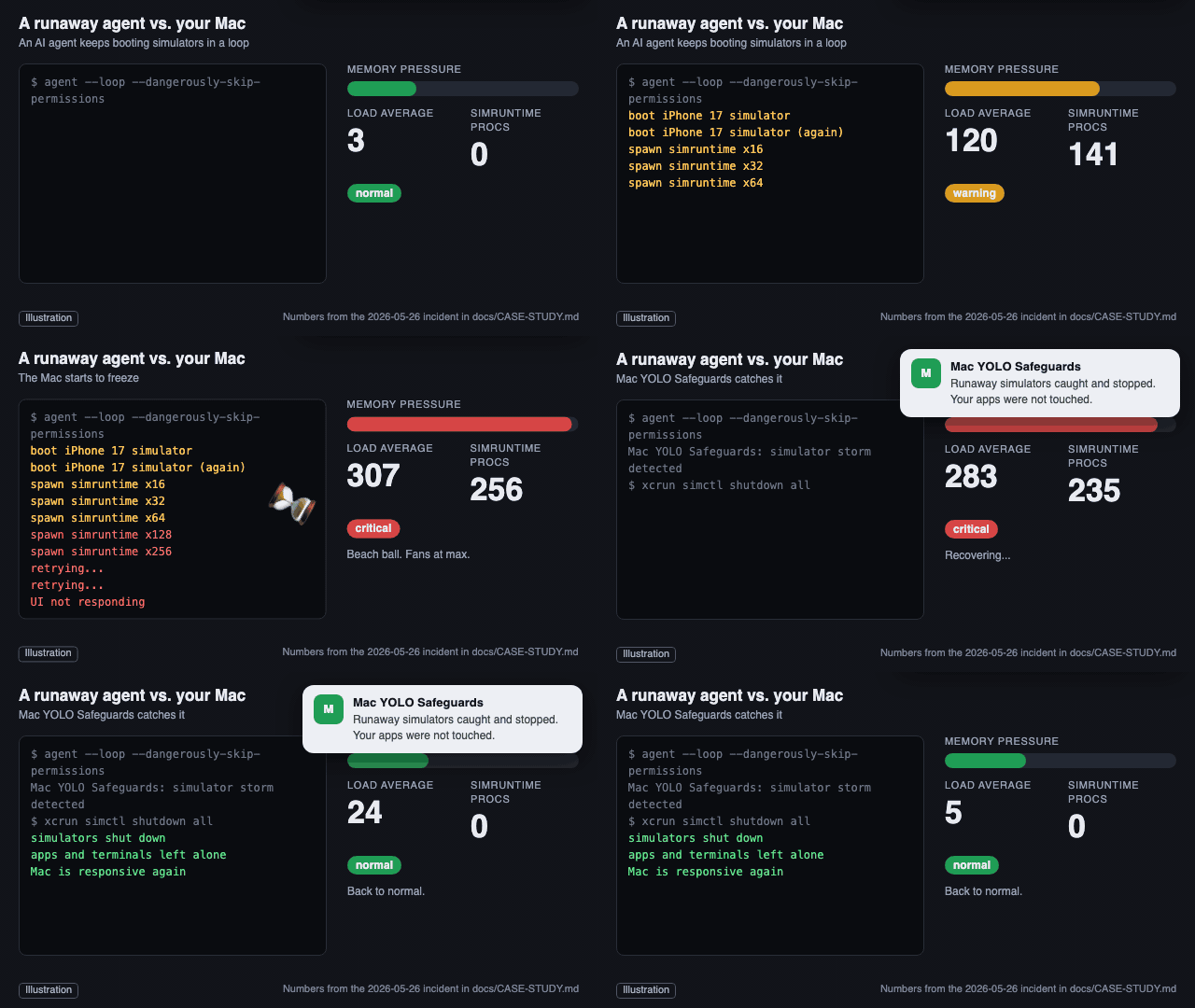
On May 26, 2026, a coding agent booted an iPhone simulator that kept forking until my Mac's load average hit 307 and it stopped responding. The guard that grew out of that night is what this app runs.
The stop-or-spare logic has 37 test cases. Four replay process snapshots recorded on a Mac running many agents, 24 are variations of one of those snapshots, and 9 were written by hand from past incidents.
Pricing
| Free | Pro Guard: $29 once | |
|---|---|---|
| See load, top hogs and every agent | Yes | Yes |
| Stop leftovers and clean caches | When you click | Without a click, while the app is open and Auto-Guard is on |
| When you're not clicking | Nothing is cleaned up until you click | Checked once a minute while the app is open and Auto-Guard is on. Leftovers are stopped when memory runs short. When memory is critical, Codex and Claude Code terminal sessions idle for a day can be stopped too, and the command to resume each one is saved. Caches are cleaned when less than 10 GB of disk is free, at most once an hour. When the internet connection is jammed, bulk uploads can be paused |
| Download | $29 once, yours to keep. No subscription. Not working for you? Reply to your receipt within 30 days for a full refund. |
Auto-Guard starts on when you activate Pro. At critical memory it can end a very large process even inside a live session, and agent terminal sessions idle for a day. It can pause big uploads. The Free Agent RAM and Stop Runaways buttons shut down every running iOS simulator, including one you are using. Details below.
Payments go through Stripe. See the refund policy.
Questions
Will it kill my work? It can. Ending processes is what it does, and no rule for choosing them is perfect. It looks for leftovers: MCP servers and helpers that outlived their session, and floods of 40 or more copies of one command. When memory is critical it can also end a single process using at least 16 GB, or half your Mac's memory if that is more. A running agent session itself is spared, but a very large process an agent started, such as a build or a script, can be ended. So can any other very large process that is not a system process, a Mac app or a known database or model server. With Pro, when memory stays critical, it can end Codex and Claude Code terminal sessions that have been idle for 24 hours; the command to resume each one is saved to a file. The Stop Runaways and Free Agent RAM buttons shut down every running iOS simulator, and Stop Runaways ends file searches of your home folder that match a pattern it considers stuck. Version 1.2.8 and earlier also deleted folders in /private/tmp whose names start with claude- or yolo-scratch- and were last changed more than 2 hours ago, each time you clicked Stop Runaways. That could include the temporary files of a Claude Code session still in use. Version 1.2.9 removed this. If you have an older version, update. With Pro, when the app measures a jammed internet connection, it can pause bulk uploads (rsync, scp, rclone, aws s3, docker push, gh release upload, Apple notarization uploads and self-hosted CI runner jobs). It is built to resume them when the line is quiet or after 10 minutes; if one stays paused, kill -CONT with its process number resumes it. Commit your work and keep backups.
Does it stop every freeze? No. Version 1.2.13 acts on memory and disk and, with Pro, on a jammed internet connection. It does not react to CPU load. If your Mac is slow because too many jobs are running at once while memory is fine, the app shows the load and the biggest users, and you decide what to stop.
Can I see what it runs? Mostly. The rules that choose what to stop, the disk cleanup and the secret scan are plain JavaScript files inside the app. Right-click the app, choose Show Package Contents and open Contents/Resources/tools. The window itself is compiled Swift, and so is the button that shuts down iOS simulators. The source repository is private. The app does not ask for Full Disk Access, Accessibility or Automation permission, and it never empties your Trash.
Does it send my data anywhere? It does not upload your files, your transcripts or the secrets it finds, and it needs no account. It does use the network for a few things: it pings 1.1.1.1 and your router to measure your connection, Test Speed uses speed.cloudflare.com when you click it, and a Pro license is renewed with macyolosafeguards.io. See the privacy policy.
Can I see the code? The source is private. Every download is signed with an Apple Developer ID and notarized by Apple.
Who made it
I'm Igor Ganapolsky. I run several AI coding agents on one Mac every day and built this after my machine froze one too many times. Bug reports and questions go in GitHub issues.